Page 3 of 7 FirstFirst 1234567 LastLast
Results 31 to 45 of 96

Thread: To overclock or not?

Hybrid View

Previous Post Previous Post   Next Post Next Post
  1. #1
    Platinum+ Member bhxtyrant's Avatar
    Join Date
    Jan 2005
    Posts
    702
    "what the heck is the 7.0x about "

    after i changed the "CPU Frequency Multiple Setting" to user defined it opened the option to change the "CPU Frequency Multiple".The "CPU Frequency Multiple" was originally set to 7.0x i bumped it up to 10x as you suggested.now im gonna try to change the other options

    :EDIT: ok i changed everything with the exception of one.you said change the memory frequency to "sync" but in that menu there wasnt a "sync" option.the options were percentages ranging from 50% to 200% and it also had "auto" i have i changed it from 100% to "auto" hope that is correct.Everything started fine but i didi notice the CPU temp raised from 51C to 56-57C

    Also would that tool happen to be called "ASUS Smartdoctor" ? http://www.softpedia.com/get/Tweak/V...rtDoctor.shtml oops looks like this tool is for GFX cards only hmm ill keep looking.

    :EDIT2:found a program called "Asus Tempster 2.00 " this might be the one you were talking about.Let me know when you get a chance
    Last edited by bhxtyrant; February 1st, 2005 at 15:26 PM.

  2. #2
    Friendly Neighborhood Super Moderator phishhead's Avatar
    Join Date
    Apr 2002
    Location
    San Diego, Ca.
    Posts
    3,409
    bhxtyrant which board do you exactly is it the a7n8x-x, a7n8x-e deluxe, a7n8x-deluxe, a7n8x? the bios I gave you was for the a7n8x I believe...just went to the download site and it was down for me.

    here is the windows flasher that fastgame was talking about. Since I trashed the other bios using the DOS utility I've been using the windows version.here is the newest one.
    http://www.asus.com/pub/ASUS/mb/flash/Asusupdt60301.zip

    now I would set your fsb to 166 and ram to optimal. and keep your multiplier at 12 and reboot see if it stays.166 x 12= 1992. that should be your standard setting for the 2400xp (pretty sure its clocked at 2000mhz.)
    Last edited by phishhead; February 1st, 2005 at 16:58 PM.


  3. #3
    Platinum+ Member bhxtyrant's Avatar
    Join Date
    Jan 2005
    Posts
    702
    Yep according to the utility its up from 1996.00MHZ to 2004.53MHZ the board i have is the ASUS A7N8X.Sorry for the confusion i think i looked under the wrong board on the ASUS site when i posted before.I thought i had the A7N8X-X but i just checked again and its the A&N8X.

    So far everything seems to be working.I did have one problem.Fastgame said turn the "CPU External Frequency" to 200mhz when i tried the PC wouldnt start up so i had to put it back to 133 or 166.

    Now i have another question.The more i mess around here the more interested i become.Im really thinking about at least upgrading to 1gig of PC3200 ram and a newer CPU probally the XP 3200+ i wanted to ask is there any certain thing i should look out for to make sure the processor i purchass is "unlocked" so i can tweak its settings?
    Last edited by bhxtyrant; February 1st, 2005 at 16:22 PM.

  4. #4
    Friendly Neighborhood Super Moderator phishhead's Avatar
    Join Date
    Apr 2002
    Location
    San Diego, Ca.
    Posts
    3,409
    Quote Originally Posted by bhxtyrant
    Fastgame said turn the "CPU External Frequency" to 200mhz when i tried the PC wouldnt start up so i had to put it back to 133 or 166.
    If you raise your fsb to 200 gonna have to lower the cpu multipiler to 10. 200 x 100 = 2000mhz. or 166 x 12= 1992mhz. so I would raise the fsb to say 200 and your cpu to 8x and see if it boots. then just do baby steps til it crashes on boot or wont boot then just back it down. also you might want to raise your CAS timings on the memory to relax it a bit.

    Im really thinking about at least upgrading to 1gig of PC3200 ram and a newer CPU probally the XP 3200+ i wanted to ask is there any certain thing i should look out for to make sure the processor i purchass is "unlocked" so i can tweak its settings
    If you want a good cpu that is unlocked then I think Fastgame would agree on the 2600XP mobile CPU.

    and 1 gig of midgrade good memory go for the Geil Ultra Series Value Dual Channel 184 Pin 1GB(512MBx2) I posted this because its midgrade memory that will OC great. but if money is no option then ofcourse go all out like Mr. Fastgame does.


  5. #5
    Friendly Neighborhood Super Moderator phishhead's Avatar
    Join Date
    Apr 2002
    Location
    San Diego, Ca.
    Posts
    3,409
    save your cash on the cpu and spend it on a gig stick of good memory. and overclock the crap out of it.
    now as far as the temp that is definately high. are you using a thermal pad or grease. I would never OC a cpu using the thermal pad get yourself some artic silver and apply that. also if you take your side panel off does the temp go down? If so then now we need to work on the airflow of your case.
    at min. you should have 1 80mm in the front blowing in and one in the back blowing out. then if your case has more slots I would recommend filling those bad boys up. Also getting round IDE and floppy cables will help with the air flow, along with cleaning up and tucking back any wires that you can manage. If you really want to go for it. I used round sheetmetal snips and cut a 120mm in the side and 1 in the top of my old case. the side one should be intake and top should be exhaust and that will push all the hot air from your PSU out of the case.


  6. #6
    Hardware guy Super Moderator FastGame's Avatar
    Join Date
    Apr 2002
    Location
    Blasters worm farm
    Posts
    3,089
    Yep according to the utility its up from 1996.00MHZ to 2004.53MHZ
    "CPU External Frequency" to 200mhz when i tried the PC wouldnt start up so i had to put it back to 133 or 166.
    so i take it that you also set the CPU mutiplier to 12 x 166 when you did this ?

    Will that CPU run @ mutiplier 10 X 166 ?

    i wanted to ask is there any certain thing i should look out for to make sure the processor i purchass is "unlocked" so i can tweak its settings?
    Only CPU's you can buy that are unlocked are the Mobiles like phishhead linked to
    Last edited by FastGame; February 1st, 2005 at 18:26 PM.

  7. #7
    Platinum+ Member bhxtyrant's Avatar
    Join Date
    Jan 2005
    Posts
    702
    Dont have alot of time to post right now so i'll just ask this and answer the questions in a little bit.

    As far as the Mobiles go will they fit into a regular socket A as well?May be a stupid question but im still learning

  8. #8
    Platinum+ Member bhxtyrant's Avatar
    Join Date
    Jan 2005
    Posts
    702
    save your cash on the cpu and spend it on a gig stick of good memory. and overclock the crap out of it.
    now as far as the temp that is definately high. are you using a thermal pad or grease. I would never OC a cpu using the thermal pad get yourself some artic silver and apply that. also if you take your side panel off does the temp go down? If so then now we need to work on the airflow of your case.
    at min. you should have 1 80mm in the front blowing in and one in the back blowing out. then if your case has more slots I would recommend filling those bad boys up. Also getting round IDE and floppy cables will help with the air flow, along with cleaning up and tucking back any wires that you can manage. If you really want to go for it. I used round sheetmetal snips and cut a 120mm in the side and 1 in the top of my old case. the side one should be intake and top should be exhaust and that will push all the hot air from your PSU out of the case.
    I havent tried taking the side panel off as i had no need to go inside the case as of yet.

    The way my case is set up inside is very cleaned up.All wires possible are tucked away and i have two 80mm fans one front blowing out and one rear blowing in.Id like to add a third fan on the top blowing out but i have never modded a case before so ill have to be real carful doing that.I dont have a fan in the side window panel yet either not on this PC anyway.

    If you raise your fsb to 200 gonna have to lower the cpu multipiler to 10. 200 x 100 = 2000mhz. or 166 x 12= 1992mhz. so I would raise the fsb to say 200 and your cpu to 8x and see if it boots. then just do baby steps til it crashes on boot or wont boot then just back it down. also you might want to raise your CAS timings on the memory to relax it a bit.
    I will give that a try right now after i finish this post.As for raise the CAS timing it was originally set to 5 and FastGame said make it 3 should i change it back to 5?

    so i take it that you also set the CPU mutiplier to 12 x 166 when you did this ?

    Will that CPU run @ mutiplier 10 X 166 ?
    Nope it would run when i left it on 10x 166 when i tried that it made a weird beeping noise until i manually rebooted to get back in bios and change it.

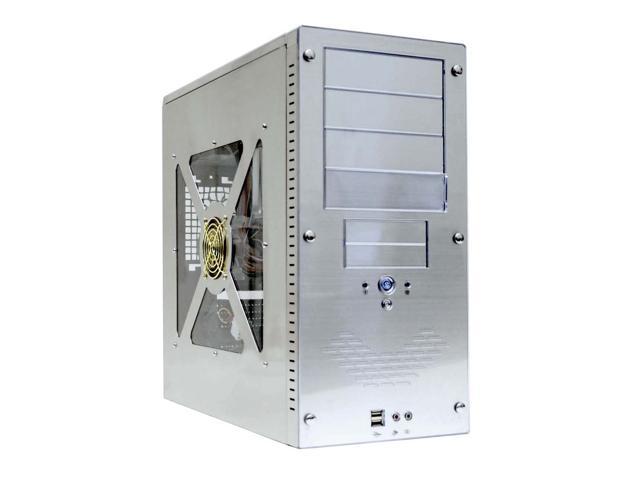
    Man after viewing that site i want this case! http://www.newegg.com/app/ViewProduc...144-090&depa=1 lol I just love the look of it.
    Last edited by bhxtyrant; February 1st, 2005 at 22:54 PM.

  9. #9
    Hardware guy Super Moderator FastGame's Avatar
    Join Date
    Apr 2002
    Location
    Blasters worm farm
    Posts
    3,089
    Quote Originally Posted by bhxtyrant
    I will give that a try right now after i finish this post.As for raise the CAS timing it was originally set to 5 and FastGame said make it 3 should i change it back to 5?
    wait a minuite.......where did I say CAS 3 ??? also I never even heard of CAS 5 Ram.
    Quote Originally Posted by FastGame
    CAS# latency= 2.5
    RAS# to CAS# delay= 3
    RAS# precharge= 3
    cycle time= 11
    RAS to CAS isn't the same as *CAS*

    If your Rams original CAS was 5 then it must be some crummy Ram. Also thats not what you listed in your first post with your system specs.
    Quote Originally Posted by bhxtyrant
    Timings-
    Frequency- 133.1 mhz
    FSB Dram- 1:1
    CAS# latency- 2.5 clocks
    RAS# to CAS# delay- 3 clocks
    RAS# precharge- 3 clocks
    cycle time- 6 clocks
    One thing about OC'n, the numbers need to be straight

  10. #10
    Silver Member
    Join Date
    Oct 2004
    Location
    Ohio
    Posts
    320
    Quote Originally Posted by bhxtyrant
    Man after viewing that site i want this case! http://www.newegg.com/app/ViewProduc...144-090&depa=1 lol I just love the look of it.
    i just ordered it today cant wait till it gets here the one i have now is shit i took off the sidepanel drilled a few holes cut a whole in the top and mounted a hard drive on top of it lol dunno y but tya its in pretty bad shape...got the case for like 40 bucks off ebay go figue

  11. #11
    Platinum+ Member bhxtyrant's Avatar
    Join Date
    Jan 2005
    Posts
    702
    Quote Originally Posted by Nate89
    i just ordered it today cant wait till it gets here the one i have now is shit i took off the sidepanel drilled a few holes cut a whole in the top and mounted a hard drive on top of it lol dunno y but tya its in pretty bad shape...got the case for like 40 bucks off ebay go figue
    Lol yeah i did the same at first i bought an antec mid tower case which is very nice for around $100 then when i built my second system i got a case called the


    This case is almost identical to it except on mine the power/reset buttons are a little larger more of an oval shape,and the usb ports/speaker jacks are hidden with a magnetic door.
    "super designer x-window" its a decent case i paid like $70 for but i dont really like it and neither have enough airflow to do any serious Overclocking to without major upgrade to the case which i have no expierience in.So i think the aspire case is a nice way around the modding problem.This will be my first overclocking project should be fun.

    @FastGame-

    Ive been on the hunt for AMD Mobile athlon xp 2600+'s with no luck however i have seen the AMD mobile athlon xp 2800+'s have any expierience with them?I actually am watching an XP-M 2600+ on ebay for $70 and a 2800+ for like $60.Still got like 3-4 days left on bidding so im trying to get a last mintute bid in lol.A local PC store i called said the XP-M 2600+ were like $140 which doesnt sound right since ive seen them average $70-96 on the net.
    Last edited by bhxtyrant; February 3rd, 2005 at 05:22 AM.

  12. #12
    Silver Member
    Join Date
    Oct 2004
    Location
    Ohio
    Posts
    320
    Quote Originally Posted by bhxtyrant
    \Ive been on the hunt for AMD Mobile athlon xp 2600+'s with no luck however i have seen the AMD mobile athlon xp 2800+'s have any expierience with them?I actually am watching an XP-M 2600+ on ebay for $70 and a 2800+ for like $60.Still got like 3-4 days left on bidding so im trying to get a last mintute bid in lol.A local PC store i called said the XP-M 2600+ were like $140 which doesnt sound right since ive seen them average $70-96 on the net.

    here u go bhxtyrant mobile 2600 ull need to grab a cpu fan though since this is oem it doesnt come with one

  13. #13
    Silver Member
    Join Date
    Oct 2004
    Location
    Ohio
    Posts
    320
    o ok but i still suggest newegg over ebay thats where i and many others get all their parts from its a great store and ive ordered countless parts from then and nothing has been wrong never had to rma or anything but i heard that was a breeze too

    Quote Originally Posted by bhxtyrant
    Ive been on the hunt for AMD Mobile athlon xp 2600+'s with no luck however i have seen the AMD mobile athlon xp 2800+'s have any expierience with them?I actually am watching an XP-M 2600+ on ebay for $70 and a 2800+ for like $60.Still got like 3-4 days left on bidding so im trying to get a last mintute bid in lol.A local PC store i called said the XP-M 2600+ were like $140 which doesnt sound right since ive seen them average $70-96 on the net.

    Quote Originally Posted by bhxtyrant
    Ah yes i know about newegg.com i just prefer to go to a local shop to grab one if possible.I only like ordering online as last resort.
    id say use ebay as a last resort order from newegg first not off ebay because newegg u can return if it doesnt work or if they send u the wrong product

  14. #14
    Hardware guy Super Moderator FastGame's Avatar
    Join Date
    Apr 2002
    Location
    Blasters worm farm
    Posts
    3,089
    Yes go to phishheads link and read the 167 reviews

  15. #15
    Succeded in braking Windo TZ Veteran Dehcbad25's Avatar
    Join Date
    Apr 2002
    Location
    DE - USA
    Posts
    2,222
    When I overlocked mine, I actually first found the sweet spot to be at 390 Mhz FSB or something like that. For RAM I actually have PC3500 (since it is certified to run at 433, 400 should be a piece of cake)
    I have the A7N8X Del V2. And did have some problems. I can't remember how I got the work.
    The first heatsink you posted is similar to the one I have (Aero Jet7 from Coolermaster)
    It is quite big. And it is not that great according to reviews. Kind of noisy, but when I overclocked it actually colled down the CPU very good

Posting Permissions

  • You may not post new threads
  • You may not post replies
  • You may not post attachments
  • You may not edit your posts
  •